PROFILEOS
Everything ProfileOS can do, area by area.
A complete overview for model agencies, teams and independent models – clients, bookings, models, advertising, teamwork and money, explained plainly.
PROFILEOS
Two account types, one clear set of tools
ProfileOS has one account for model agencies and teams and one for independent models.
Both share the core: clients, bookings, the calendar and an overview of the money. Whatever only makes sense with several people – staff, roles, commissions or several locations – belongs to the agency account. Wherever a function is available in just one of the two, the sections below say so.
Agency and team account
Everything a model agency needs to run the day together with its team.
- Client records with checks, warnings and full history
- Bookings, calendar and booking details sent to models
- Member Access, coaching and services
- Model files, Sedcards, agencies and locations
- Advertising, ad portals, SEO and link management
- Team chat, tasks, ideas, media and documents
- Revenue, commissions, deposits and Money Manager
- Team members with roles and permissions
Independent model account
A private workspace for the business you run on your own.
- Your own client records with checks and warnings
- Bookings and your personal calendar
- Member Access for your clients
- My Profile with gallery and Sedcard
- Advertising and ad portals with a password vault
- Tasks, ideas, media and documents
- Income, deposits and Money Manager
Included in both
The same foundation, whichever account type you choose.
- Runs in the browser on phone, tablet and computer
- Five languages, chosen by each person
- Privacy Mode and dark mode
- Help Centre with guides and support tickets
- Sample data for trying everything out
PROFILEOS
Clients and client check
Know your clients before you confirm a booking.
The client check (in the menu: Client Match) compares every new enquiry with the clients you already know. Each client has a single record that stays up to date and brings together everything your team has learned about them.
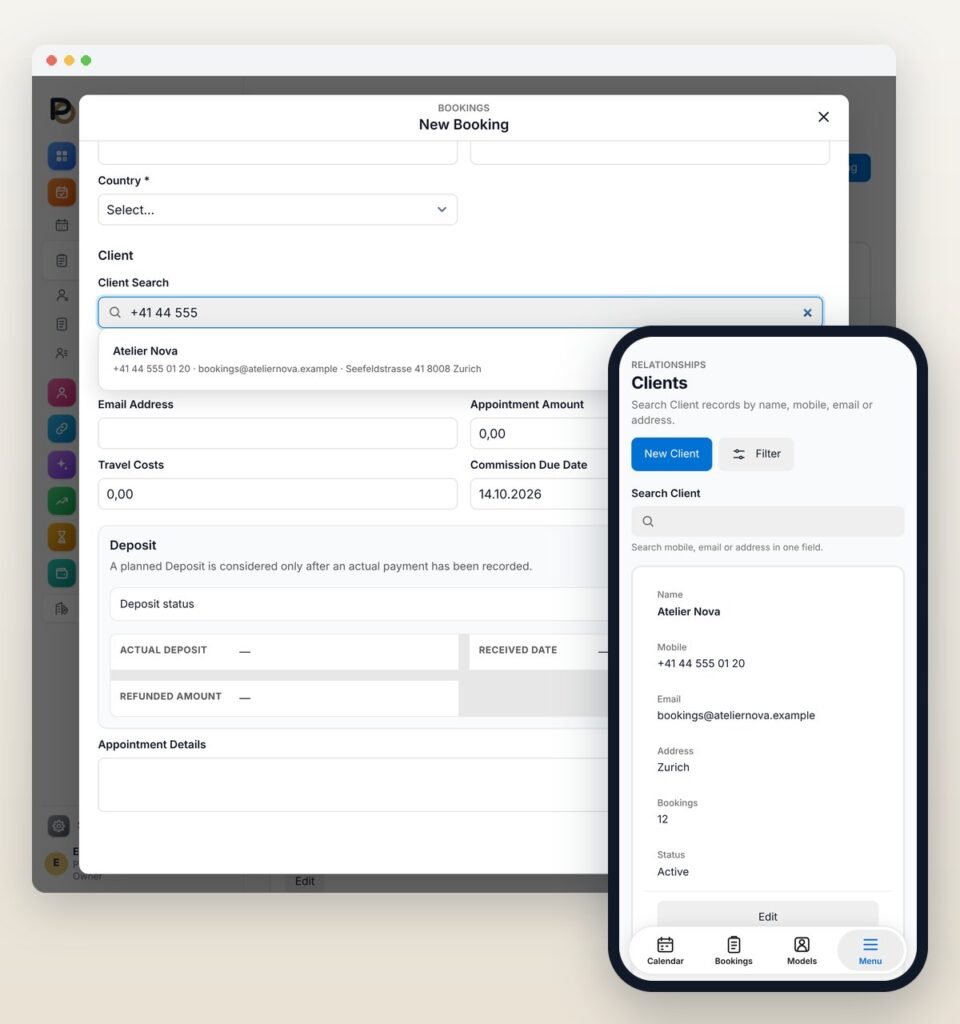
Client check
Enter the phone number or email address of a new enquiry, and ProfileOS shows straight away whether this client already exists. You then continue in that record instead of creating a duplicate.
- One search field for phone number, email or address
- Blocked clients stay visible in the results, marked with a warning
Client records and notes
Every client record lists the earlier bookings; in an agency it also shows which models the client has booked.
- Notes on each client, visible only to people with permission
- For independent models, notes stay inside their own account
Blocked clients
Blocked Clients holds clients you no longer want to work with, together with the reason. A new booking or Member Access for such a client triggers a clear warning and can only be saved after an explicit confirmation.
- A warning also appears when an address matches a blocked client
PROFILEOS
Bookings and calendar
Every booking with date, time, client, location and amount – and a calendar built from exactly these bookings.
Agencies assign one or several models to a booking; independent models plan their own bookings. Amounts can be entered in several currencies: ProfileOS keeps the exchange rate of the day and shows your figures in one reporting currency.
Bookings
Record date, time, client, location, amount and travel costs, then assign the right model.
- Agencies can add more than one model to the same booking
Status at every step
Each booking shows where it stands: enquiry, deposit received, confirmed, completed, cancelled or no-show.
- Agencies also record who cancelled: the model, the client or on site
Notice for overlapping times
If a model already has a booking at the same time, ProfileOS points this out clearly as soon as you save. Cancelled bookings and no-shows are left out, and the decision stays with you.
Deposits
For each booking you note whether a deposit was received, kept, partly or fully refunded. When the booking is completed, the deposit is credited against it.
Calendar views
The calendar shows your bookings as a running plan, by day, by week or for a period you choose, with filters for a quick overview.
Send the booking details to the model
For a confirmed booking, ProfileOS prepares a message with all details for WhatsApp or Telegram. You check the preview, the messenger opens and you send it from there.
- Only for agencies and teams
PROFILEOS
Member Access, coaching and services
Sell more than bookings and keep every payment in view.
Each of these areas has its own list of open items: unpaid Member Access sorted by client, open coaching sessions and services sorted by model. Independent models work with Member Access; coaching and services are part of the agency account.
Member Access
Sell and manage paid access to a members’ area – for example a membership or subscription – with client, duration and status (pending, active, expired or cancelled), including payment, refunds and renewals.
- For agencies and independent models
Coaching
Plan coaching sessions online, on site or as a mix of both, and follow the status, payment and any refund of each session.
- Only for agencies and teams
Services
Record services with their type and progress – draft, in progress, completed or cancelled – together with the payment that belongs to them.
- Only for agencies and teams
PROFILEOS
Models, profiles and Sedcard
All information about a model in one place, and a Sedcard you can share as a PDF.
Agencies keep a file for every model. Independent models manage the same information for themselves under My Profile, together with their own rates.
Model files
Name, profile name, contact channels such as WhatsApp, Telegram, email and social media, measurements, notes and a status that shows at a glance whether a model is active, on a break or inactive.
- Agencies and teams; independent models use My Profile
Photos and Sedcard
Every model has a profile photo and a gallery. For the Sedcard you choose the fields and photos, set their order, pick a logo and create a PDF with a protective watermark to share or download.
- During the free trial, each gallery holds a limited number of photos
Agencies and locations
Work with several agencies and their locations, assign a model to more than one agency and use a separate logo for each location.
- Only for agencies and teams
PROFILEOS
Advertising and platforms
See where each model is presented and what still needs to be done.
Agencies and independent models manage the platforms they use, the countries and regions they work in and every step until a profile is published.
Platforms and countries
Keep a list of the platforms you use, and choose the countries and regions for each model and each agency.
Advertising workflows and tasks
Every model has an advertising workflow with a status such as “waiting for approval” or “approved and active”, together with its history. Sign-up and publishing work appears as advertising tasks.
Platform log-ins in a protected vault
Log-in details for your platforms are kept in a vault. Passwords and two-factor codes are stored encrypted, shown only with a separate permission and copied with one click; log-in names, links and notes are not encrypted.
- Available to independent models as well
PROFILEOS
SEO and link management
For agencies that look after their own presence in search engines.
This area is part of the agency and team account. It keeps your search engine work organised in one place – it does not promise any position in search results.
Guided setup
A setup assistant takes you through the first steps in this area, one step after the other.
Measures and optimisation
An overview lists your SEO measures and the optimisation work for your pages side by side.
Links and portal access
Manage your links in one list and keep the log-in details for portals in a protected area, with passwords stored encrypted.
PROFILEOS
Working together
Conversations, tasks and files stay where your clients and bookings already are.
Agencies discuss their work in the team chat. Tasks, ideas, media, documents and tools are available in both account types.
Team chat
One-to-one and group chats with voice messages, photos, videos, documents, links and favourites, plus notifications on your phone. New messages are end-to-end encrypted. Attachments are deleted automatically after a set time, so the chat does not turn into a file store.
- Only for agencies and teams
Tasks and ideas
A task has a person responsible, a due date and a priority, and you can assign any task to yourself. Advertising tasks appear in the same list. Ideas are collected separately and become a task with one click.
Media, documents and tools
Contracts, invoices, model releases, legal and marketing files are kept protected, searchable and with a version history – as images, PDF, Word, Excel or PowerPoint. Under Tools you list the programs and services you use, with protected log-in details.
PROFILEOS
Revenue, commissions and deposits
See what bookings and direct sales bring in, and who is owed what.
Amounts follow their booking. If a booking moves to another month, its revenue, commission and open balance move with it.
Revenue overview
Revenue from bookings and direct sales in one list, with filters and an export as a CSV file.
Model commissions
The commission of each model for any period, with totals and a PDF report.
- Only for agencies and teams
Outstanding commissions
Open commissions at a glance, including payment plans when a model pays in instalments.
- Only for agencies and teams
Outstanding deposits
Collect deposits from clients and, in an agency, settle them with the model afterwards.
Payment desk for accountants
Accountants see the payments of the locations assigned to them, and only those.
- Only for agencies and teams
Bank accounts
Store the bank accounts used for deposits and payouts; their details are kept encrypted.
PROFILEOS
Money Manager
Your accounts, income and expenses in one view.
Money Manager calculates the balance of each account from all incoming and outgoing payments recorded in ProfileOS. It gives you a clear picture of your money; it is not accounting software and does not replace your accountant or tax adviser.
Accounts and balances
An overview, the individual transactions and an account summary show where each account stands today.
Income, expenses and statistics
Record income and expenses, sort expenses into categories of your own and look at the results in the statistics.
Scheduled and recurring payments
Plan a payment for a fixed date or let it repeat; once paid, it moves into the history.
- Agencies can also move money between their own bank accounts through clearing accounts, in full or in part
PROFILEOS
Team, roles and permissions
Everyone sees what they need for their work, and nothing more.
Managing a team is part of the agency and team account. You decide who joins, which role they have and what they may do in each area.
Invite team members
Invite colleagues by email. The invitation link is valid for a limited time, and an open invitation already takes up a place in your plan. New members start without any permissions until you grant them.
Roles
The main owner is fixed. Staff members and accountants join the team; accountants can be limited to individual agencies or locations and are invited by the main owner only.
Permissions per action
For each area you decide who may view, create, change, delete or download. Presets for read only, a custom selection or full access help you, and full access can only be granted by the main owner.
- Blocking or removing a team member keeps their history
PROFILEOS
Workspace, devices and help
A workspace that is ready for your day, on every screen and in your language.
Protection in detail – two-factor authentication, the Lock Screen with PIN and the way data is stored – is described on the Security page.
Overview with daily briefing
The start screen greets you and shows the bookings of the day, open amounts and the models who are active.
On every device
ProfileOS runs in the browser on phones, tablets and computers, and you can add it as an app icon on iPhone, Android or your computer.
Your language
English, German, French, Spanish or Thai: each person chooses a language, which also applies to the emails they receive, as well as a date format.
Privacy Mode and dark mode
One tap on Privacy Mode, or Alt+Shift+P, blurs names, amounts, contact details and photos on screen while the browser tab stays open. Dark mode is there for anyone who prefers a darker screen.
Your own fields
With the form editor, agencies add their own fields to models, clients, bookings and other areas, and these fields can be searched.
- Only for agencies and teams
Help and sample data
The Help Centre offers frequently asked questions, guides with a search and support tickets with attachments, answered right inside the program. Sample data sets up a demo workspace with models, clients, bookings and figures that you can remove again.